

Get Jun-2026 Dumps to Pass your FCSS_LED_AR-7.6 Exam with 100% Real Questions and Answers
Updated Exam FCSS_LED_AR-7.6 Dumps with New Questions
NEW QUESTION # 53
If a FortiAP fails to connect to FortiGate, which component should be checked first?
Response:
- A. SNMP settings
- B. FortiManager schedule
- C. CAPWAP discovery configuration
- D. DNS records
Answer: C
NEW QUESTION # 54
When configuring a FortiSwitch trunk port, which actions are needed?
(Choose two)
Response:
- A. Specify allowed VLANs
- B. Disable LLDP
- C. Set native VLAN ID
- D. Enable RSTP
Answer: A,C
NEW QUESTION # 55
Refer to the exhibits.


A company has multiple FortiGate devices deployed and wants to centralize user authentication and authorization. The administrator decides to use FortiAuthenticator to convert RSSO messages to FSSO, allowing all FortiGate devices to receive user authentication updates.
After configuring FortiAuthenticator to receive RADIUS accounting messages, users can authenticate, but FortiGate does not enforce the correct policies based on user groups. Upon investigation, the administrator discovers that FortiAuthenticator is receiving RADIUS accounting messages from the RADIUS server and successfully queries LDAP for user group information. But, FSSO updates are not being sent to FortiGate devices and FortiGate firewall policies based on FSSO user groups are not being applied.
What is the most likely reason FortiGate is not receiving FSSO updates?
- A. The LDAP server is not configured to retrieve group memberships for RSSO users.
- B. The FortiAuthenticator interface is not enabled to receive RADIUS accounting messages.
- C. FortiAuthenticator is missing the FSSO user group attribute in the configuration.
- D. The RADIUS Username and Client IPv4 attributes are not defined on FortiAuthenticator.
Answer: D
Explanation:
In this design, FortiAuthenticator receivesRADIUS accounting (RSSO) messages, looks up the user in LDAP to get group information, theninjects FSSO logon eventstoward all FortiGate devices.
From the exhibits we know:
* FortiAuthenticatoris receiving RADIUS accountingfrom the RADIUS server.
* LDAP queries are successful and return group membership.
* But FortiGatedoes not receive FSSO logons, so identity-based policies are not applied.
For FortiAuthenticator to create an FSSO logon, the RADIUS accounting record must be correctlyparsed into at least:
* Username
* Client IP address
These are mapped from the RADIUS attributes in theRADIUS Accounting SSO clientconfiguration (for example, User-Name and Framed-IP-Address). If these are not defined or mapped incorrectly, FortiAuthenticator can see the accounting packet butcannot build a valid FSSO session, so no update is sent to FortiGate.
Thus the most likely root cause is:
#The RADIUS Username and Client IPv4 attributes are not correctly definedfor that RADIUS Accounting SSO client (optionA).
Other options conflict with the scenario:
* B- LDAP is already successfully returning groups.
* C- FSSO user group attribute is separate; even without it, FSSO logons would still be created (just without group mapping).
* D- The interfaceisreceiving RADIUS accounting, so it is clearly enabled.
NEW QUESTION # 56
Which CLI command displays managed FortiSwitch status from FortiGate?
Response:
- A. get switch-controller managed-switch
- B. diagnose switch-controller get-conn-status
- C. get system interface
- D. show switch-controller global
Answer: A
NEW QUESTION # 57
Refer to the exhibit.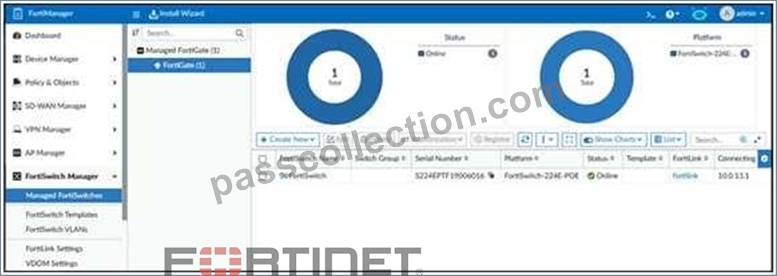
The FortiManager device is set to central management mode for FortiSwitch devices. How are configuration changes applied to multiple FortiSwitch devices? Response:
- A. Changes are made through a template.
- B. Configuration changes require manually updating each device.
- C. Changes are applied only to switches that share the same model number.
- D. Configuration changes are made on individual switches.
Answer: D
NEW QUESTION # 58
How can FortiAIOps help optimize network performance in an SD-Branch deployment with FortiGate, FortiSwitch, and FortiAP?
- A. It uses Al-driven analytics to identify network issues and provide optimization recommendations.
- B. It predicts and resolves all network issues without any human intervention.
- C. It disables low-performing APs and switches automatically.
- D. It removes the need for SD-WAN configuration by automating all routing decisions.
Answer: A
Explanation:
In an SD-Branch deployment (FortiGate + FortiSwitch + FortiAP),FortiAIOps:
* Collects telemetry and logs from Fabric devices
* Usesmachine-learning / AI analyticsto:
* Spot anomalies (latency, packet loss, RF issues, misconfigurations)
* Highlight root causes
* Proposeoptimization recommendations(e.g., channel changes, power tuning, config fixes) It doesnot:
* Automatically disable devices (Afalse)
* Replace SD-WAN config or all routing (Cfalse)
* Fixallissues with zero human input (Dis marketing fantasy, not reality)
NEW QUESTION # 59
In each user certificate, you can define the subject field, expiration date. User Principal Name (UPN), URL for CRL download, and the OCSP URL. How does the detailed configuration of these attributes impact the certificate?
- A. It enables precise identification of the user and ensures timely certificate revocation checks.
- B. It makes the certificate easier to revoke manually because it reduces the need for automatic checks.
- C. It limits the validity of the certificate to specific devices and applications, reducing its general usability.
- D. It makes the certificate compatible with a wide range of applications and services by ensuring universal validity
Answer: A
Explanation:
In user certificates used with FortiGate / FortiAuthenticator / SSL-VPN / 802.1X, the following attributes are important:
* Subject field & UPN
* Provide a unique identity for the user (CN and/or UPN).
* FortiGate can use theSAN/UPNfield for LDAP-integrated certificate authentication.
* Expiration date
* Limits how long the certificate is valid, enforcing lifecycle and rotation.
* CRL URL & OCSP URL
* Tell FortiGate (or any relying party)where to check if the certificate has been revoked.
* Enablesnear real-time revocationusing OCSP or periodic CRL downloads instead of relying only on expiration.
By carefully configuring these fields:
* The certificate uniquely and correctly identifies the user.
* Relying systems can performaccurate and timely revocation checks, improving security.
Why other options are wrong:
* A: It does the opposite-CRL/OCSP increase automation, not manual revocation.
* B: These attributes do not inherently limit a cert to specific devices; that's done via key usage, EKU, or device certs.
* D: They don't "ensure universal validity"; they make the certprecisely boundto one identity with enforceable lifetime and revocation.
NEW QUESTION # 60
Which FortiGuard licenses are required for FortiLink device detection to enable device identification and vulnerability detection?
- A. FortiGuard Threat Intelligence and FortiGuard Endpoint Protection
- B. FortiGuard Threat Intelligence and FortiGuard loT Detection
- C. FortiGuard Attack Surface Security and FortiGuard loT Detection
- D. FortiGuard Vulnerability Management and FortiGuard Endpoit Protection
Answer: C
Explanation:
FortiLink device detection relies on FortiGate'sDevice IdentificationandIoT Detectioncapabilities to classify devices connected to FortiSwitch ports.
To enabledevice identificationandvulnerability detectionfor IoT/endpoint devices in LAN Edge deployments, FortiGate must subscribe to the correct FortiGuard services.
1. Required FortiGuard License for Device Identification (IoT Detection) The FortiOS documentation clearly states:
"IoT detection service... requires anAttack Surface Security Rating service licenseto download the IoT signature package." Additionally:
"The following settings are required for IoT device detection:
A validAttack Surface Security Rating service licenseto download the IoT signature package." This service provides:
* IoT signature package
* IoT device classification
* Device behavior profiling
This makesAttack Surface Securitymandatory for FortiLink device detection.
2. Required FortiGuard License for Device Vulnerability Detection
FortiOS further clarifies that IoT vulnerabilities require theIoT Detection license, which is included under the same Attack Surface service entitlement:
"To detect IoT vulnerabilities the FortiGate must have a validIoT Definitions license..." The IoT Definitions license comeswith the Attack Surface Security Rating serviceand is used for:
* Scanning connected devices
* Identifying IoT/endpoint vulnerabilities
* Reporting vulnerability severity
* Enabling NAC-based remediation (VLAN steering, port isolation)
In LAN Edge Architect, this license combination is emphasized as a foundational requirement for:
* FortiSwitch NAC
* FortiLink device profiling
* Automated quarantine actions
* IoT device classification
* Vulnerability-based segmentation
3. Why the Correct Answer Is Option D
OptionDlists:
#FortiGuard Attack Surface Security
#FortiGuard IoT Detection
These are exactly the services required per FortiOS 7.4.1:
* Attack Surface Security Rating# provides IoT signature package + vulnerability data
* IoT Detection (Definitions)# enables actual device-type and vulnerability identification Together they powerFortiLink Device DetectionandIoT Vulnerability Detection, which are essential LAN Edge security functions.
4. Why Other Options Are Incorrect
A). Vulnerability Management + Endpoint Protection
Not used for FortiLink device detection; Endpoint detection relies on IoT service, not FortiClient.
B). Threat Intelligence + IoT Detection
Threat Intelligence (ThreatIntel DB) is used for FAZ IOC, not LAN Edge device detection.
C). Threat Intelligence + Endpoint Protection
Same issue-does not provide IoT device classification or vulnerability scanning.
LAN Edge 7.6 Architect Context Summary
In LAN Edge designs:
* FortiGate acts as the controller for FortiSwitch via FortiLink.
* Device detection is done at the FortiGate level using NAC/IoT signature capabilities.
* Vulnerability detection enables dynamic segmentation decisions (e.g., move device to quarantine VLAN).
To support this, two licenses aremandatory:
* Attack Surface Security(includes Security Rating + IoT Detection DB)
* IoT Detection(part of the same entitlement, but explicitly required for vulnerability detection) Thus the verified answer aligns perfectly with LAN Edge operational requirements and Fortinet documentation.
NEW QUESTION # 61
While configuring syslog, which protocol options are supported by FortiAuthenticator?
Response:
- A. Only UDP
- B. Only TCP
- C. UDP, TCP, and TLS
- D. UDP and TCP
Answer: C
NEW QUESTION # 62
Which two actions must be taken to configure FortiAuthenticator to send logs to a syslog server?
(Choose two)
Response:
- A. Specify syslog server IP and port
- B. Enable LDAP debug
- C. Configure SNMP traps
- D. Choose syslog facility
Answer: A,D
NEW QUESTION # 63
An LDAP server has been successfully configured on FortiGate, which forwards authentication requests to a Windows Active Directory (AD) server. Users can authenticate using PAP, but authentication fails with MSCHAPv2. Why is it not recommended to use PAP for authentication?
Response:
- A. PAP is only supported for local user accounts, not external authentication sources.
- B. PAP does not support domain-based authentication for Active Directory.
- C. PAP requires the use of an insecure port that is easily blocked by firewalls.
- D. PAP sends passwords in cleartext.
Answer: D
NEW QUESTION # 64
You are troubleshooting a Syslog-based single sign-on (SSO) issue on FortiAuthenticator, where user authentication is not being correctly mapped from the syslog messages. You need a tool to diagnose the issue and understand the logs to resolve it quickly.
Which tool in FortiAuthenticator can you use to troubleshoot and diagnose a Syslog SSO issue?
- A. Debug logs > SSO Sessions page
- B. Debug logs > Remote Servers > Syslog Viewer
- C. Debug logs > Single Sign-On > Syslog SSO
- D. Parsing Test Tool
Answer: C
Explanation:
Context: You're troubleshootingSyslog-based SSOonFortiAuthenticator:
* Devices (typically firewalls, WLAN controllers, VPN gateways) sendsyslog messagescontaining usernames, IPs, login/logout events.
* FortiAuthenticator parses those logs usingSyslog SSO rulesand injects logon sessions intoFSSOfor FortiGate.
When users are not mapping correctly, you need to see:
* Did the syslog message arrive?
* Which matching rule (if any) caught it?
* What username and IP were extracted?
* Why was a message ignored or rejected?
FortiAuthenticator has a dedicated debug area for this:
Debug logs # Single Sign-On # Syslog SSO
This view shows:
* Raw syslog lines received
* Thematching ruleapplied (or "no match")
* Parsed fields (username, IP, group)
* Any parsing errors
This is exactly the tool designed totroubleshoot and diagnose Syslog SSO issues.
Why the other options are not the best for this issue
* A. Debug logs > Remote Servers > Syslog Viewer
* Lets you see syslog traffic in general, but doesnotshow how SSO rules are applied or why they fail. Good for connectivity checks, not SSO logic.
* B. Parsing Test Tool
* Useful totestpatterns and rules manually by pasting sample log lines, but it doesn't show live traffic or running SSO sessions.
* C. Debug logs > SSO Sessions page
* Shows existing SSO sessions (who is logged in), but notwhya particular syslog message did not create a session.
NEW QUESTION # 65
Refer to the exhibits.

Examine the FortiGate RSSO configuration shown in the exhibit.
FortiGate is set up to use RSSO for user authentication. It is currently receiving RADIUS accounting messages through port3. The incoming RADIUS accounting messages contain the username in the User- Name attribute and group membership in the Class attribute. You must ensure that the users are authenticated through these RADIUS accounting messages and accurately mapped to their respective RSSO user groups.
Which three critical configurations must you implement on the FortiGate device? (Choose three.)
- A. The rsso-endpoint-attribute CLI setting in the RSSO agent configuration should be set to User-Name.
- B. The RADIUS Attribute Value setting configured for an RSSO user group should match the class RADIUS attribute value in the RADIUS accounting message.
- C. Device detection and Security Fabric Connection should be enabled on port3
- D. The sso-attribute CLI setting in the RSSO agent configuration should be set to Class.
- E. RSSO user groups should be assigned to all firewall policies.
Answer: A,B,D
Explanation:
The problem states:
* FortiGate receivesRADIUS accounting messagesonport3.
* User-Nameattribute contains the username.
* Classattribute contains the group membership.
* Goal: authenticate users through RSSO and map them to the correct user groups.
To achieve this, three critical components must be configured:
#A. RADIUS Attribute Value in the RSSO group must match the Class attribute This is mandatory because:
* RSSO user groups on FortiGate match users based onthe value inside the RADIUS attribute(usually Class).
* For group assignment to work, FortiGate must compare:
RSSO User Group # RADIUS Class Attribute Value
This isexactly how FortiGate maps RSSO users to groups.
#D. RSSO agent's sso-attribute must be set to Class
Thesso-attributedefineswhich RADIUS attribute contains the group information.
Because group membership is carried in:
#Class attribute
You must configure:
config user radius
set sso-attribute Class
end
This tells FortiGate:
"Use the Class attribute to derive user group membership."
#E. rsso-endpoint-attribute must be set to User-Name
This identifieswhich RADIUS attributecarries the actualusername.
In this scenario:
* RADIUS accounting messages contain the username inUser-Name.
* So the correct setting is:
config user radius
set rsso-endpoint-attribute User-Name
end
This ensures the RSSO user object uses the correct username.
#Incorrect Options Explained
B). Assign RSSO user groups to all firewall policies
Not required.
You only assign them to policies where RSSO authentication is used.
C). Device detection and Security Fabric Connection should be enabled on port3 Totally irrelevant to RSSO.
RSSO only needs RADIUS accounting, not device detection or Fabric services.
NEW QUESTION # 66
What is the primary function of a captive portal in guest Wi-Fi onboarding?
Response:
- A. Automatically redirect traffic to DNS
- B. Force client to use VPN
- C. Allow access only after user authentication or acceptance
- D. Encrypt all packets using SSL
Answer: C
NEW QUESTION # 67
Which steps can help restore communication between FortiGate and a FortiSwitch?
(Choose two)
Response:
- A. Restart FortiSwitch's SNMP agent
- B. Verify DHCP Option 138
- C. Set switch role to "Root Bridge"
- D. Check FortiLink interface status
Answer: B,D
NEW QUESTION # 68
When troubleshooting a captive portal issue, which POST parameter in the redirected HTTPS request can be used to track the user's session and ensure that the request is valid?
- A. username
- B. redir
- C. email
- D. magic
Answer: D
Explanation:
In FortiGate captive portal workflows (local or external):
* Client connects to SSID / interface that has captive portal enabled.
* Client makes an HTTP/HTTPS request.
* FortiGate intercepts and redirects to alogin page(local or external URL).
* The portal form is submitted viaPOSTback to FortiGate.
To prevent tampering and to tie the POST back to thecorrect user session, FortiGate includes a special hidden parameter in the redirect and expects it in the POST:
* The parameter is namedmagic.
The magic value:
* Is aunique tokengenerated per captive-portal session.
* Encodes/session-links the user's IP, interface, and session info.
* Allows FortiGate to ensure that:
* The POST comes from the user who initiated the original request.
* The request is not a random or replayed submission.
When troubleshooting:
* If the external portal does notpreserve and resendthe magic parameter back to FortiGate exactly as received, authentication fails, and you'll see errors like "session not found" or "invalid magic".
Why the other fields are not used for this purpose
* A. username- Just the login ID; multiple users can use the same username from different locations, so it can't uniquely track the browser session.
* B. redir- Contains the URL the user originally requested, so they can be sent back there after login. It is not a session integrity token.
* D. email- Optional field used in some guest/registration flows; irrelevant to session validation.
NEW QUESTION # 69
Which encryption protocols can CAPWAP use to secure the data channel when communicating between a FortiGate wireless controller and FortiAP?
Response:
- A. DTLS and IPsec
- B. WPA3 and TLS
- C. SSL/TLS and IPsec
- D. SSH and SSL
Answer: A
NEW QUESTION # 70
A network engineer is deploying FortiGate devices using zero-touch provisioning (ZTP). The devices must automatically connect to FortiManager and receive their configurations upon first boot. However, after powering on the devices, they fail to register with FortiManager.
What could be a possible cause of this issue?
- A. The FortiGate device must be preloaded with a configuration file before ZTP can function.
- B. The FortiGate device requires manual intervention to accept the FortiManager connection.
- C. In this scenario, the ZTP process works only when devices are connected using a console cable.
- D. The FortiManager IP address is not reachable over TCP port 541.
Answer: D
Explanation:
Zero-Touch Provisioning (ZTP) for FortiGate devices is handled throughFortiDeploy, which automatically connects a FortiGate toFortiManagerso the device can download configuration templates and be centrally managed.
For ZTP to work, the newly booted FortiGate must successfully reach FortiManager. One of thecritical requirementsis connectivity over theFGFM (FortiGate-FortiManager) management protocol, which uses:
TCP Port 541
This is clearly stated in multiple Fortinet documents:
* FortiGate Cloud Admin Guidelists port541as the management channel used for FortiGate # FortiManager / FortiGate Cloud communications:"Management... Protocol: TCP, Port:541"
* FortiOS Administration Guidealso confirms this:"FortiManager provides remote management of FortiGate devices overTCP port 541." Since ZTP uses FortiDeploy to push the FortiManager IP to the device and relies on FGFM (port 541) for registration and configuration delivery,any failure on this port breaks the entire ZTP workflow.
Why option D is correct
If the FortiGate cannot reach FortiManager onTCP/541, itcannot register, cannot be authorized, and cannot receive its configuration - leading to a ZTP failure.
This is themost common causein real deployments:
* Firewall blocking TCP/541
* Upstream NAT device not forwarding 541
* ISP restrictions
* Incorrect FortiManager IP or routing issue
* ZTP device behind a network that does not allow outbound 541
Why the other options are incorrect
A). The FortiGate device requires manual intervention to accept the FortiManager connection.
Incorrect.
ZTP is built specifically to avoid manual intervention. Once the FortiDeploy key is used, the device auto- connects to FortiManager without needing local acceptance.
B). ZTP works only when devices are connected using a console cable.
Incorrect.
ZTP requiresno console cable- that's the whole point. It relies on DHCP, WAN connectivity, and FortiDeploy auto-join.
C). The FortiGate device must be preloaded with a configuration file before ZTP can function.
Incorrect.
Preloading configuration defeats the purpose of ZTP.
ZTP delivers the initial configuration automatically from FortiManager using FortiDeploy.
LAN Edge 7.6 Architect Context
LAN Edge deployments often use FortiManager as the central orchestrator for:
* FortiSwitch management via FortiLink
* FortiAP wireless provisioning
* SD-Branch configuration templates
* Security Fabric automation
For all of this, ZTP enables remote sites to deploy FortiGate, FortiSwitch, and FortiAP withno on-site expertise.
If TCP/541 to FortiManager is blocked, the entire LAN Edge deployment pipeline fails, making optionDthe only valid and document-supported answer.
NEW QUESTION # 71
Refer to the exhibits.
FortiGate RSSO configuration
FortiGate RSSO Group
FortiGate interface configuration
RSSO authentication has been configured on FortiGate. Port3 has been enabled to receive RADIUS accounting messages. Internet access is available through port1. FortiGate is successfully handling incoming RADIUS accounting messages, ensuring that RSSO users are correctly mapped to the RSSO Group user group. The administrator realized that internet access is open to all users and aims to enforce access restrictions, ensuring that only RSSO users are permitted to have internet access. Which configuration change should the administrator apply to address this issue? Response:
- A. Change the RADIUS attribute value setting to match the name of the RADIUS attribute containing the group membership information of the RSSO users.
- B. Create a second firewall policy from port3 to port1, and select the target destination subnets.
- C. Modify the firewall policy and add RSSO Group as a Source.
- D. Configure a local user group and manually add users to enforce authentication-based restrictions.
Answer: C
NEW QUESTION # 72
You are configuring machine authentication on a FortiAuthenticator. Which settings must be enabled?
Response:
- A. bind LDAP group to policy
- B. set radius-auth enable
- C. set machine-auth enable
- D. define endpoint compliance profile
Answer: C
NEW QUESTION # 73
Which steps are required to configure RADIUS SSO (RSSO) on FortiAuthenticator?
(Choose three)
Response:
- A. Enable RSSO group mapping
- B. Configure FortiGate to use FortiAuthenticator as RADIUS server
- C. Set FortiAuthenticator as LDAP proxy
- D. Enable RSSO in FortiGate security policy
- E. Define RSSO attribute in FortiAuthenticator
Answer: A,B,E
NEW QUESTION # 74
You want to create an SSID named "CORP" on FortiManager and assign it to a FortiAP. Which steps are required?
(Choose three)
Response:
- A. Push configuration to FortiGate
- B. Define SSID under AP Profile
- C. Assign profile to FortiAP
- D. Reboot AP
Answer: A,B,C
NEW QUESTION # 75
In FortiManager CLI, how do you enable FortiAIOps monitoring?
Response:
- A. config system aiops → set enable
- B. FortiAIOps is enabled by default in managed mode
- C. config system global → set ai-monitor enable
- D. config aiops settings → set collection-mode full
Answer: B
NEW QUESTION # 76
......
Fortinet FCSS_LED_AR-7.6 Exam Syllabus Topics:
| Topic | Details |
|---|---|
| Topic 1 |
|
| Topic 2 |
|
| Topic 3 |
|
| Topic 4 |
|
100% Pass Guarantee for FCSS_LED_AR-7.6 Exam Dumps with Actual Exam Questions: https://examdumps.passcollection.com/FCSS_LED_AR-7.6-valid-vce-dumps.html
